BA
Baluu
Docs
    • How to Add a Regular Event?
    • What is Termly Event and How to Use It (trials and drop-ins)
    • How to Create an Appointment Event?
    • Managing Tickets & Pricing
    • Can I sell products on Baluu?
    • Notes & Auto-Emails
    • What happens when I get a booking?
    • Event FAQs
    • Booking Questions
    • Images
    • Logging into your Baluu Dashboard
    • Struggling to login
    • New article
    • Step-by-step guide to create your Baluu website
    • Getting Started: Understanding Availability Types
    • Calendar View
    • Managing Reviews and Post-Event Emails in Baluu
    • How Do I Create Gift Cards?
    • How to Manage and Create Discount Codes?
    • How to Add and Manage Team Members?
    • How to Access Invoice from Baluu and Manage Billing
    • Customer Login Centre - How customers can manage their bookings on Baluu
    • Customers Section
    • How to Set Up and Sell Memberships on Baluu
    • How to add Booking Policies
    • Recommended Baluu Website Image Guidelines
    • How to Create and Send Newsletters in Baluu
    • Baluu Event Types and Which One to Choose?
    • Early Access Events
    • How to Display Your Baluu Reviews on an External Website?
    • How to Embed Baluu into Your Website
    • Your Social Media Profiles
    • Webpage Navigation Bar
    • Your Logo
    • When I Can't Reduce the Availability by One

Webpage Navigation Bar

Where to edit the navigation bar and what it looks like in action.

You can find your navigation bar in 'Website', then 'Navigation'.
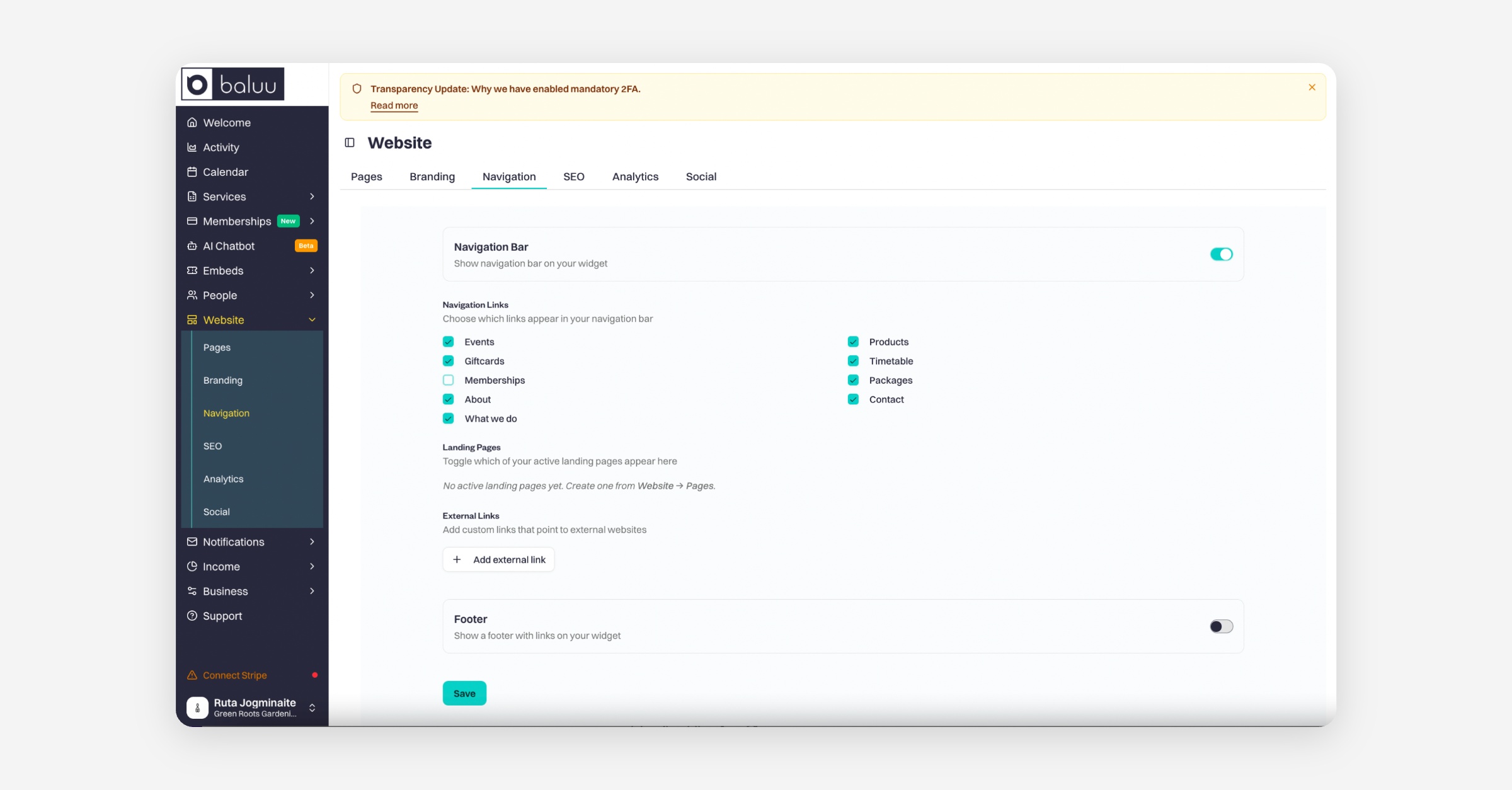
Firstly, you can toggle the navigation bar on or off. You may want it off if you only want your customers to see the page you link them to, or if you are embedding a specific page and have no use for it,

In the lower section, you can tick which tabs you want to appear in your navigation bar.

PrevYour Social Media Profiles
NextYour Logo
Was this helpful?